Site work. One diary.
ConSiteLog — digital construction diary
Workers record the work done. The manager compiles the day, adds details and approves it. The site's work history stays in one place.
No payment card needed to start.
Workers enter, the manager compiles
Timesheets, materials and photos
Diary export as DOCX and PDF
FROM DAILY TIMESHEET TO SITE DIARY
How does keeping a construction diary work?
Nobody has to rewrite the same work description from a blank page. Workers' daily entries are the source data for the manager's diary.
- 01
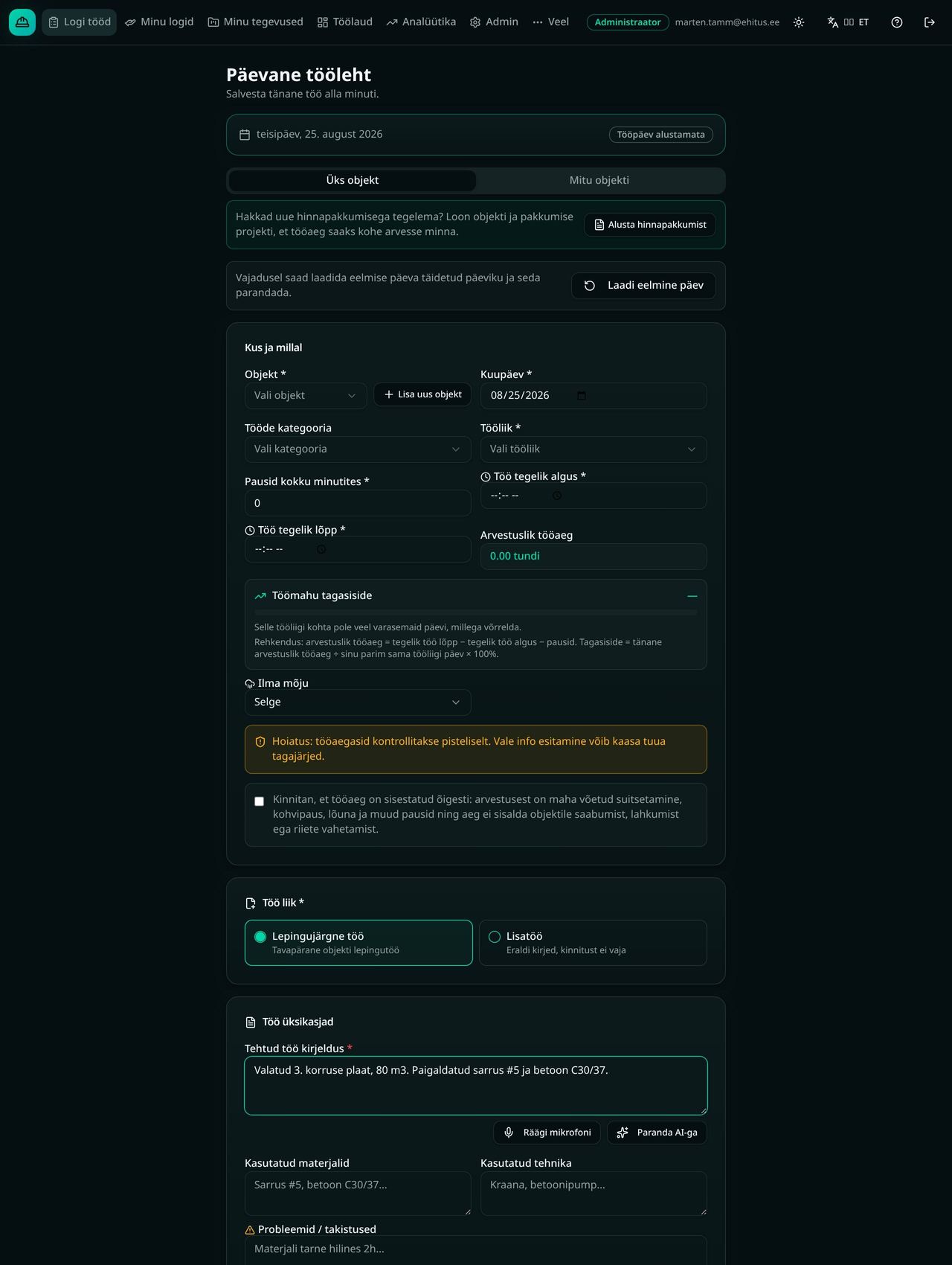
The worker fills in a daily timesheet
The worker selects the site, date and type of work and records start, end and breaks. They describe the work done, materials and equipment used, and any problems or obstacles. Photos can be added if needed.
- 02
The manager compiles the site diary
The manager selects the site and date. ConSiteLog brings up that day's worker timesheets. The manager chooses whose data to include; work descriptions and materials are gathered from the selected timesheets.
- 03
The manager completes and approves
The manager checks the compiled information and adds weather data, hidden-works certificates, supervision notes and other diary fields. Approval locks the diary; an administrator can reopen it if needed.
- 04
The diary is kept and can be exported
Site diaries can be found by date. The manager can download a diary as a DOCX file or print it and save it as PDF from the browser.
What goes into a construction diary?
The ConSiteLog diary has fields for both the day's work and the site's background information. The manager reviews the compiled data before approving.
- Date, entry number, site and address
- Contractor, contract and diary author
- Work done and materials used
- Weather and circumstances affecting the work
- Hidden-works certificates and waste removal
- Supervision notes and responsible persons
Questions and answers
What is a digital construction diary?
It is date-based documentation of a site's work and circumstances. In ConSiteLog the manager compiles the diary from workers' daily timesheets and adds site, weather, materials and supervision information.
Is a worker's timesheet the same as the construction diary?
No. A worker's timesheet describes their day: time, work done, materials and obstacles. The site diary combines the same-day data of the workers the manager selects and includes extra site and supervision fields.
Who can compile and approve the diary?
In ConSiteLog, managers and administrators compile and approve construction diaries. Workers enter their daily timesheets. An administrator can reopen an approved diary.
Can materials and photos be added to the diary?
Material descriptions, quantities and photos can be added to a worker's timesheet. Materials from the selected timesheets are gathered into the diary. Photos stay with the timesheets, so nobody has to describe them by hand.
Can the diary be exported as PDF?
Yes. In the diary's print view you can choose to save as PDF in the browser's print dialog. You can also download the diary in DOCX format.
Does the ConSiteLog diary suit every construction site?
The diary includes site, work, weather, materials, hidden-works and supervision fields. Before using it, check your site's documentation and signing requirements with the responsible specialist or client. Approving a diary in the app is not a digital signature.
Can the diary be filled in on a phone?
Workers fill in their daily timesheet in the phone browser. ConSiteLog can also be added to an iPhone or Android home screen. An internet connection is required; the worker view is available in Estonian, English, Russian and German.
How does the trial start and what does it cost?
Create a company account and confirm your email address. Then add a site and invite workers to try the workflow with your team. The trial lasts 60 days and no payment card is needed to start. After that the price is €7.99 per user per month + VAT.
Try it with your own site and team
Create a company account, confirm your email, add a site and invite your workers. Fill in the first timesheet and compile a construction diary from it.
60 days free · then €7.99/user/month + VAT
Want to ask something first? Contact us.